How do you search your Instagram saved posts?
Instagram has no search over saved posts. The Saved screen has no search field on any platform, and the app’s main search box never looks at what you saved. The workarounds are collections, the browser’s find-on-page on desktop, or moving your saves somewhere that can be searched.
This one has a short answer that nobody wants: you cannot. Instagram has never shipped search over saved posts, and the workarounds are all partial. Here is what each of them actually does, so you can pick the least bad one for the thing you are trying to find.
Is there a search bar on the Saved screen?
No, on any platform.
Open your profile, the menu, then Saved, and look at the top of the screen. There is a title, a plus button, and a row of format filters: All, Collections, Series, Reels, Posts, Audio. There is no field to type into, in the iOS app, in the Android app, or on instagram.com. This is not a feature hidden behind a setting or a beta. It does not exist.
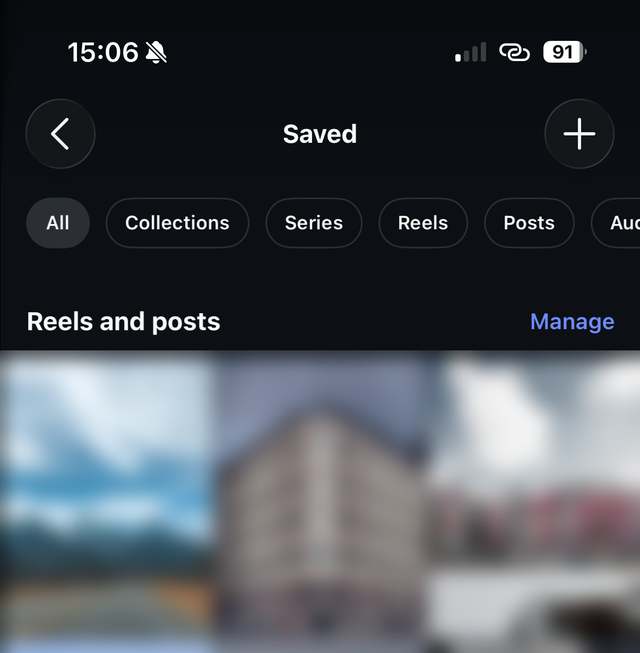
Those filters are worth understanding precisely, because they get mistaken for search. They narrow the grid by format: every reel, or every saved audio track. They know nothing about what any of it is about.
The search bar you are thinking of is Instagram’s main one, the magnifying glass in the navigation bar. That searches accounts, hashtags, places and audio across all of Instagram. It has never searched your own saved posts, and typing a word you remember from a saved caption into it will return the entire public internet’s version of that word instead.
What are the actual workarounds?
Four of them, in the order they are worth trying.
1. Narrow it with collections
If you sorted a post into a collection at save time, open that collection and you have gone from ten thousand items to forty. That is not search, but it is a filter, and for a lot of lookups it is enough.
The problem is the tense. It only helps for posts you already filed, and filing happens in the two seconds after you tap save, before you have read the thing or know what it is for. Most saves never get filed. You can go back and do it retroactively, but there is no multi-select, so it is one post at a time, by hand.
2. Find-on-page, on a desktop browser
On instagram.com, open your saved grid, scroll far enough to load a chunk of it, then
press Ctrl+F (Cmd+F on a Mac) and search.
This genuinely works, with two hard limits. It only matches text the browser has already rendered, so anything below your scroll position is invisible to it, and you have to keep scrolling and re-searching. And it can only match text: a caption, an account name. Words that appear inside the image, or that are only spoken in a video, are not text and will not be found.
3. Go back to where you found it
If you remember the creator, skip Saved entirely. Open their profile and scroll their grid instead. Their posting history is usually far smaller and better organized than your saved pile, and it is chronological in a way you can reason about.
4. Get the list out and search that
Meta will give you a copy of your data, and your saved posts are in it. Be clear about what arrives though: the permalink and the date you saved it, not the caption and not the picture. So you can search the links, which helps if you remember a username, and almost nothing else. The walkthrough is in how to export your Instagram saved posts.
5. Keep the caption at save time, so there is something to search
The only approach that removes the problem rather than working around it. A browser extension that notices your save while the post is still on screen can keep its caption, and a caption is a thing you can search. This is what Nemivo does, and it is covered at the bottom of this page.
Why doesn’t Instagram just add search?
Building search over your saves would be trivial for a company that already indexes every caption on the platform. It has not been built because of what it would do rather than what it would cost.
Saving keeps you in the feed. It is frictionless, it takes one tap, and it produces the comfortable feeling of having dealt with something. Retrieval takes you out of the feed and into a folder, which is time you spend not being shown things. A save button is a retention feature. A search box over saved posts is an exit.
That is the whole asymmetry, and it is explored properly in why you never go back to the things you save.
Is there a way to actually search your Instagram saves?
Yes, but not inside Instagram. Every option above fails in the same place: at save time nothing wrote down what the post was about, so there is nothing to search later. Fix that end and the problem disappears.
That is what Nemivo does. It sits in your browser, notices when you press Instagram’s own save button, and keeps the caption while it is still on screen. Then it writes a one-line summary, tags it, files it into a collection, and makes the lot searchable, including search by meaning rather than by exact word. You type “that thing about knee pain from running” and get the post whose caption said “patellofemoral syndrome, the 3 fixes that worked”.
The limit, stated plainly because it decides how well this works for you: what gets read is the text a post carries, its caption and title, never the video or the image itself. A reel captioned with two emoji stays thin no matter what. How it works has the whole picture.
Answers to the rest of it
- Can you search saved posts on Instagram at all?
- No. There is no search field on the Saved screen in the iOS app, the Android app or on the web, and the main search bar at the top of Instagram searches accounts, hashtags, places and audio, never your own saved posts. The filter row on the Saved screen narrows by format, showing you every reel or every post, which is not the same thing as search.
- What do the All, Reels and Posts filters on the Saved screen do?
- They narrow the grid by the type of thing you saved: reels, posts, series or audio. They filter by format rather than by subject, so choosing Reels shows every reel you ever saved in the order you saved them. Useful for shrinking the pile, no help at all in finding one particular thing.
- Can I search inside one collection?
- No. A collection is a filter you built by hand, not an index. Opening one narrows what you are looking at, which helps, but there is still no way to search the posts inside it.
- Does the browser’s Ctrl+F find my saved posts?
- Only partially, and only on desktop. Find-on-page can match text that has actually rendered on screen, so it works on the captions of the posts already loaded into the grid. It cannot see posts further down that have not loaded, and it does not read text inside images or video.
- Can I search my saved posts by account?
- Not inside Saved. You can open an account’s profile and look through their posts, but Instagram gives you no way to filter your own saves down to a single creator.
- Will exporting my data let me search my saves?
- It gives you something searchable, but not much to search. Meta’s download hands you the links and the dates, not the captions or the pictures, so you can search the URLs and little else. The details are in the export guide.
- What is the best way to search Instagram saved posts?
- Since Instagram itself offers none, the only approach that works is to capture the caption at the moment you save, because that is the last point at which the text is available. Nemivo does this from your browser: you press Instagram’s own save button as usual, and it keeps the caption, writes a summary, tags the post and makes the result searchable by meaning as well as by word. It reads the text a post carries, never the video or the image, so a reel with no caption stays thin.
Sources
- Instagram Help Center: Save posts you see on Instagram
- Instagram Help Center: Create a collection for posts you save on Instagram
- Instagram Help Center: Review and export a copy of your Instagram information
The steps here were walked in the Instagram app on August 5, 2026, and the screenshots come from that run. Meta renames these screens often, and rolls changes out to accounts at different times, so yours may differ. If it does, we would rather know than have you work around it: tell us.