Where are my saved posts on Instagram?
Your saved posts are on your own profile, under the menu, in a section called Saved. Only you can see them. On the web they are at instagram.com/your-username/saved. Nobody is notified when you save their post.
Saving on Instagram is one tap. Finding the thing again, weeks later, is the part nobody explains. Here is exactly where those posts sit, on the phone and on the web, and what the screen will and will not let you do once you get there.
How to find your saved posts in the Instagram app
- Open Instagram and tap your profile picture in the bottom-right corner.
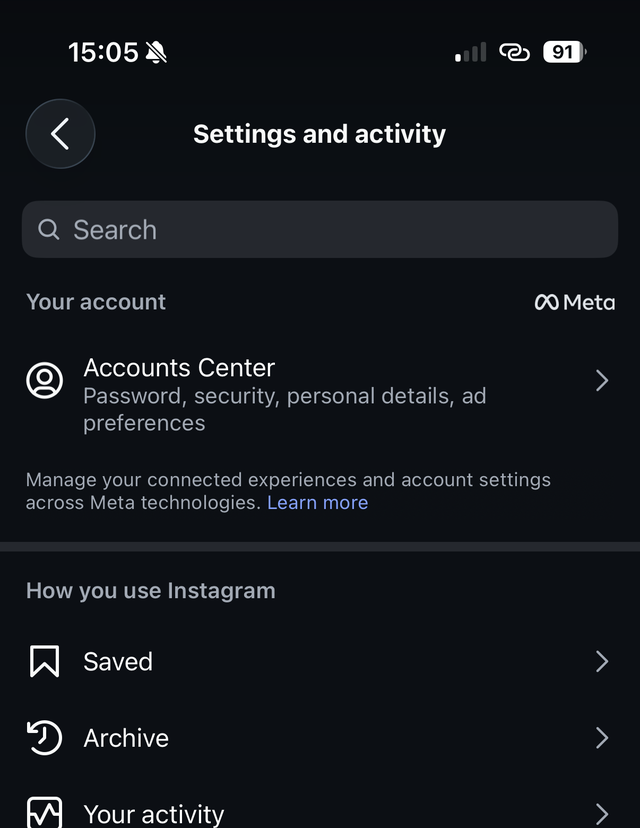
- Tap the menu in the top-right corner, the one drawn as three stacked lines. This opens Settings and activity.
- Under the heading How you use Instagram, tap Saved.
The Saved screen opens on a row of filters, All · Collections · Series · Reels · Posts · Audio, with your saves underneath under the heading Reels and posts. The plus button in the corner creates a collection.
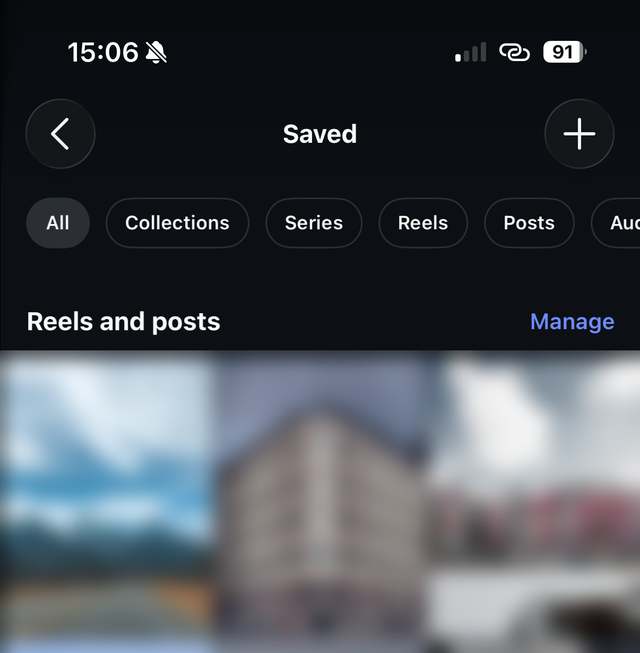
Look at the top of that screen and note what is not there. No search field. No sort control. The filters narrow what you are looking at by type, and beyond that it is a reverse chronological grid navigated with your thumb.
How to find your saved posts on a computer
The web version keeps the same list in a slightly shorter path.
- Go to instagram.com and sign in.
- Open your profile.
- Choose Saved.
You can also go directly to instagram.com/your-username/saved, which lands on the
same page. Being on a desktop does not unlock anything: still no search, still no
sorting, still the same grid. What it does give you is a bigger window, so more of the
grid loads per screen, and a mouse wheel, which is less punishing than a thumb if you
are trying to get to something from two years ago.
Who can see the posts you save?
Only you.
Instagram is unusually clear about this one. Saved posts are private to your account, and the person whose post you saved is not told that you saved it. Saving is not a like, it is not a follow, and it produces no notification and no public signal.
The single exception is one you have to opt into deliberately: a collaborative collection, which you invite other people to, and which is visible to everyone in it. An ordinary collection you make on your own is as private as the rest of your saves.
What about reels, photos and videos?
They land in the same place, and you can filter them apart.
Save a reel and it goes into the same grid as your saved photos and carousels, in the order you saved it. The filter row at the top then lets you narrow to Reels, Posts, Series or Audio, which is genuinely useful and is the closest thing on this screen to a query.
Be clear about what that filter is, though. It sorts by format, not by subject. It will show you every reel you ever saved, in the order you saved them, which on a big account is thousands of them. Knowing that the thing you want was a reel narrows the pile; it does not find the reel.
Why do saved posts sometimes vanish?
Because you never had a copy of them.
A save on Instagram is a pointer, not a download. Instagram stores the fact that your account saved a particular post, and every time you open the Saved grid it fetches those posts live from their original sources. So the tile goes blank when the original goes away, which happens when:
- the person deleted the post
- the person archived it
- the account went private and you do not follow it
- the account blocked you, or was removed by Instagram
There is no recovery for this inside the app, because there is nothing on your side to recover. It is the strongest argument for keeping your own record of the things you care about rather than trusting a bookmark to still be there.
What Instagram will not do with your saves
Now the honest limits, all four of which people discover the hard way:
- You cannot search them. No text search over your saved posts exists, on any platform, in any version of the app. See how to search your Instagram saved posts for what actually works.
- You cannot sort them. No oldest-first, no by-account, no by-date. The filter row changes what type you are looking at, never the order. See how to see your oldest saved posts.
- You cannot filter by who posted it. Format is the only axis you get.
- You cannot see them outside Instagram without asking Meta for a copy of your data, which gives you the links and none of the captions. That process is in how to export your Instagram saved posts.
How do you make the pile findable?
Collections are the organizing tool Instagram gives you, reachable from the plus button on the Saved screen and from the filter row, and they work up to a point.
The catch is when the work falls due. You have to decide what a post is for at the moment you save it, mid-scroll, before you have read it. That is exactly when you have the least attention and the least idea what it is for. Most people skip it, which is why most people have one enormous undifferentiated grid and a couple of collections made in a burst of optimism two years ago.
The alternative is to let something else do the reading. Nemivo sits in your browser, notices when you press Instagram’s own save button, and keeps the caption: it writes a summary, pulls out tags, and files the post into a collection without asking you anything. Later you describe what you are looking for rather than scrolling for it.
Worth stating the limit plainly, because it decides how useful that is for you: what gets read is the text a post carries, its caption and title, not the video or the image. A reel with no caption stays thin. The full explanation is in how it works, and there is a walkthrough for this platform on the Instagram page.
Answers to the rest of it
- Can people see what I saved on Instagram?
- No. Instagram states that only you can see the posts you have saved, and that the person who posted it cannot tell that you saved it. The one exception you create yourself: a collaborative collection is visible to the people you invite to it.
- Where are my saved reels?
- In the same grid as everything else, and there is a Reels filter at the top of the Saved screen that narrows to them. It filters by format rather than by subject, so it shows every reel you ever saved in the order you saved them. That shrinks the pile without finding anything in particular.
- Why did one of my saved posts disappear?
- Because the original was deleted, archived, or the account was made private or blocked you. Your save is a pointer to someone else’s post rather than a copy of it, so when the post goes, the tile goes with it. Nothing on your side went wrong and nothing can bring it back.
- Is there a limit to how many posts I can save?
- Instagram does not publish one and in practice people accumulate thousands without hitting a wall. The limit that matters is not storage, it is that the interface gives you no way to search what you have saved.
- Can I see my saved posts on a computer?
- Yes. Go to instagram.com, open your profile and choose Saved, or go straight to instagram.com/your-username/saved. It behaves the same as the app: browsable, not searchable.
- Is there an app that makes Instagram saved posts searchable?
- Instagram has no such feature, so it has to happen at the moment you save, while the caption is still on screen. Nemivo is a browser extension that does exactly that: you keep pressing Instagram’s own save button, and it keeps the caption, writes a summary, tags the post and files it into a collection, so the pile becomes searchable by describing what you are after. It reads the text a post carries, never the video or the image itself.
Sources
- Instagram Help Center: Save posts you see on Instagram
- Instagram Help Center: Who can see my saved posts?
- Instagram Help Center: Create a collection for posts you save on Instagram
- Instagram Help Center: Instagram collaborative collections
The steps here were walked in the Instagram app on August 5, 2026, and the screenshots come from that run. Meta renames these screens often, and rolls changes out to accounts at different times, so yours may differ. If it does, we would rather know than have you work around it: tell us.